
BGP – Peer Templates
Some networks have a lot of BGP neighbours. This may sound like a service provider problem, but it affects the enterprise as well. Think of the newer data centre technologies that use a spine/leaf topology. These include VxLAN/EVPN and Fabricpath. Each point-to-point network in the topology has a BGP neighbour relationship configured. This can result in a lot of neighbour configuration.
The way to improve on this is to group neighbours together. There are three ways to group neighbours:
- Peer-Groups
- Dynamic Update Peer-Groups
- Peer-Templates
Peer-groups were the original solution. Although designed to lower CPU usage, reduced configuration was an added bonus. Unfortunately, this wasn’t very effective at creating neighbour groups. The configuration was often similar, but not identical.
Dynamic-Update Peer-Groups improved on this idea. The router would see neighbours that were similar and group them. This saved resources as the neighbours would share BGP update messages. This is great, but the purpose is to save resources, and does not help with simplifying BGP config.
The good news is that peer-templates are here to save the day! They were designed with config reduction in mind. A template is a block of reusable configuration. One template can inherit settings from another template. This solves the issue of having neighbours with similar config.
Each peer can have one template assigned. Template inheritance creates a hierarchy of settings. If there is a need to vary from the template hierarchy, use manual configuration. Manual settings always overrides template settings.
Templates may not decrease the number of lines of config. It depends on how complex the environment it. Even so, they can help improve the structure of the configuration.
There are two types of peer template:
- Session Template – Controls neighbour settings, such as TTL security, timers and so on
- Policy Template – Controls address family settings
Configuration
To see templates in action, we’re going to create a lab. Take a look at the topology below. There is a core router, which needs to peer with five different routers. For simplicity, all routers are in the same Autonomous System (65535).
R1, R2, and R3 are ‘Service Provider-1’ routers. Routers R4 and R5 belong to ‘Service Provider-2’. These descriptions should be added to the neighbour config. Service provider 1 uses 10/30s timers, while Service provider 2 uses 20/60s timers.
Each peer needs:
- Remote-as
- Local-as
- Description
- Timers
To keep the lab below simple, the routers are pre-configured, and the core router needs to be configured. The core router already has its interfaces configured.
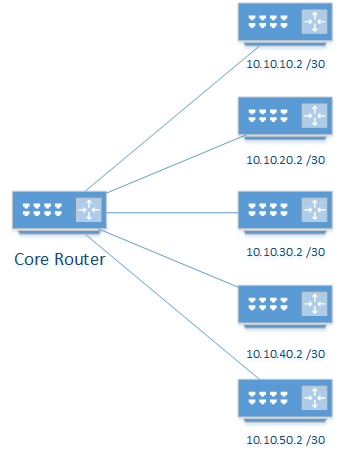
Without Peer-Templates
Let’s take a look at how this would be configured without templates.
router bgp 65000
 neighbor 10.10.10.2 remote-as 65535
 neighbor 10.10.10.2 local-as 65535
 neighbor 10.10.10.2 description Provider-1
 neighbor 10.10.10.2 timers 10 30
 neighbor 10.10.20.2 remote-as 65535
 neighbor 10.10.20.2 local-as 65535
 neighbor 10.10.20.2 description Provider-1
 neighbor 10.10.20.2 timers 10 30
 neighbor 10.10.30.2 remote-as 65535
 neighbor 10.10.30.2 local-as 65535
 neighbor 10.10.30.2 description Provider-1
 neighbor 10.10.30.2 timers 10 30
 neighbor 10.10.40.2 remote-as 65535
 neighbor 10.10.40.2 local-as 65535
 neighbor 10.10.40.2 description Provider-2
 neighbor 10.10.40.2 timers 20 60
 neighbor 10.10.50.2 remote-as 65535
 neighbor 10.10.50.2 local-as 65535
 neighbor 10.10.50.2 description Provider-2
 neighbor 10.10.50.2 timers 20 60
With Peer-Templates
The config has a better structure with a peer-template for all the common features.
Core#sh run | sec router
router bgp 65000
 template peer-session MyTemplate
  remote-as 65535
  local-as 65535
 exit-peer-session
 !
 bgp log-neighbor-changes
 neighbor 10.10.10.2 inherit peer-session MyTemplate
 neighbor 10.10.10.2 description Provider-1
 neighbor 10.10.10.2 timers 10 30
 neighbor 10.10.20.2 inherit peer-session MyTemplate
 neighbor 10.10.20.2 description Provider-1
 neighbor 10.10.20.2 timers 10 30
 neighbor 10.10.30.2 inherit peer-session MyTemplate
 neighbor 10.10.30.2 description Provider-1
 neighbor 10.10.30.2 timers 10 30
 neighbor 10.10.40.2 inherit peer-session MyTemplate
 neighbor 10.10.40.2 description Provider-2
 neighbor 10.10.40.2 timers 20 60
 neighbor 10.10.50.2 inherit peer-session MyTemplate
 neighbor 10.10.50.2 description Provider-2
 neighbor 10.10.50.2 timers 20 60
Inheritance
The structure is improved further by adding inheritable templates. In the case below, there are now three templates:
- MyTemplate – Settings common to all neighbours
- Provider-1 – Setting common to Service Provider 1. This inherits the settings from MyTemplate
- Provider-2 – Setting common to Service Provider 2. This inherits the settings from MyTemplate
As you can see, this doesn’t always decrease the number of lines of config. It does make things more structured and orderly.
Core#sh run | sec router
router bgp 65000
 template peer-session MyTemplate
  remote-as 65535
  local-as 65535
 exit-peer-session
 !
 template peer-session Provider-1
  description Provider-1
  timers 10 30
  inherit peer-session MyTemplate
 exit-peer-session
 !
 template peer-session Provider-2
  description Provider-2
  timers 20 60
  inherit peer-session MyTemplate
 exit-peer-session
 !
 bgp log-neighbor-changes
 neighbor 10.10.10.2 inherit peer-session Provider-1
 neighbor 10.10.20.2 inherit peer-session Provider-1
 neighbor 10.10.30.2 inherit peer-session Provider-1
 neighbor 10.10.40.2 inherit peer-session Provider-2
 neighbor 10.10.50.2 inherit peer-session Provider-2